| What I did this hour. This hour I did the first chapter of the Introduction to JavaScript. What specific things I learnt. I learned lots in this chapter, because I've never used JavaScript before. The things I learned were: console.log, how to add comments in Javascript, how to do arithmetic in JavaScript, how to use arithmetic characters with text, how to use the .length script, the .toUpperCase and .trim command, and the math floor, math random, and math ceiling scripts. What I will do next hour. Next hour I plan on doing the Variables chapter of the introduction to JavaScript. Image Descriptions 1: Adding my age and how long I've been coding with console.log 2: Adding comments to JavaScript using the // and /* scripts. 3: More console.log 4: Using arithmetic with JavaScript. 5: Using arithmetic with words. 6: Using the .length script to find out how many characters are in a sentence. 7: Using the .toUpperCase and .trim script 8: Using the math scripts to generate random numbers. |
|
|---|---|
 |
 |
 |
 |
 |
 |
 |
 |

Tuesday, April 28, 2020
10 hours of coding P.7

10 hours of coding P.6
| What I did this hour. This hour I finished the final two chapters of the Introduction to HTML, Form Validation and Semantic HTML. What specific things I learnt. I learned a few more HTML commands, such as: <required>, <min> <max>, <minlength> <maxlength>, <pattern>, <section>, <article>, <aside>, <figcaption>, and <audio> What I will do next hour. Next hour I plan on doing the introduction to JavaScript section, since I finished the Introduction to HTML. Image Descriptions 1: Adding the required attribute to an input, making it mandatory that it is filled. 2: Using the min, max attribute to set the min and max of the input field. 3: Setting a minlength and maxlength of the password input. 4: Using the pattern attribute to limit the characters that can be put into the input. 5: Using the section command to section off parts of the website. 6: Using the aside command to display text that wasn't in the section command. 7: Using the figcaption command to add a caption under an image. 8: Adding audio to the website using the <audio> command. |
|
|---|---|
 |
 |
 |
 |
 |
 |
 |
 |
Monday, April 27, 2020
10 hours of coding P.5
| What I did this hour. This hour I completed the HTML forms chapter of the introduction to HTML. What specific things I learnt. I learned lots in this chapter, such as: How to set up forms with inputs, adding labels to forms, setting a slider using range, how to make a checkbox input, how to make a radio input, how to add a dropdown list, and how to make a text area. What I will do next hour. Next hour I plan on doing the Form validation chapter of the introduction to HTML. Image Description: 1: Learned what a form was and how to use them. 2: Added an input to the form that could contain text. 3: Added a label to finish creating the input. 4: Created a sliding bar using the Range code. 5: Created checkbox inputs. 6: Created a radio input. 7: Created a dropdown list. 8: Learned how to create a text area. |
|
|---|---|
1 |
2 |
3 |
4 |
5 |
6 |
7 |
8 |
10 hours of coding P.4
| What I did this hour. This hour I worked on the Table chapter of Introduction to HTML. What specific things I learnt. I learned a few things, such as rowspan and colspan, the table head, body, and foot groups, and how to use CSS to customize the table a bit more. What I will do next hour. Next hour I plan on doing the next chapter of the introduction to HTML, the "Introduction to HTML forms" chapter. Descriptions for Images 1: Table Rows, I didn't learn much from this part, because we make tables often. 2: Table Data, Didn't learn much from this either, other than what to call the <td> command. 3: Table Headings, I also didn't learn much from this one, other than what <th> stands for. 4: Spanning Collumns, I learned what colspan does, and how to use it properly. 5: Spanning Rows, I learned about rowspan, and how to use rowspan and colspan together. 6: Table Head, I learned that you can sort the tables better by using the head, body and foot groups. 7: Table Foot, Quite similar to the head, only at the bottom of the table. 8: CSS, I learned a bit about CSS, and how it works with HTML tables to customize them. |
|
|---|---|
1 |
2 |
3 |
4 |
5 |
6 |
7 |
8 |
Sunday, April 26, 2020
10 hours of Coding P.3
| What I did this hour. This hour I finished the preparing for html challenge. What specific things I learnt. This hour I learned more elements for HTML. I learned about Anchors <a>, targets for anchor <a href="ex" target="_blank">, HTML paths <a href="./example.html">, How to wrap anchors around images, How to use "whitespace", indentation, and comments <!-- Example -->. What I will do next hour. Next hour I plan on doing the HTML Tables chapter of the Introduction to HTML. |
|
|---|---|
 |
 |
 |
 |
 |
 |
 |
 |
10 hours of coding P.2
| 1: What I did this hour This hour I finished the "introduction to html" and got started on the next challenge called "preparing for HTML". What specific things I learnt. I learned quite a few HTML elements today. The elements I learned were: lists <li>, <ul>, Ordered lists <ol>, how to add images <img src="">, how to add text under images <alt>, how to add videos <video>, Doctypes <!DOCTYPE html>, the head <head>, and lastly titles <title>. What I will do next hour. Next hour I plan on finishing the preparing for HTML challenge. |
|
|---|---|
 |
 |
 |
 |
 |
 |
 |
 |
Monday, April 20, 2020
10 Hours of Coding P.1
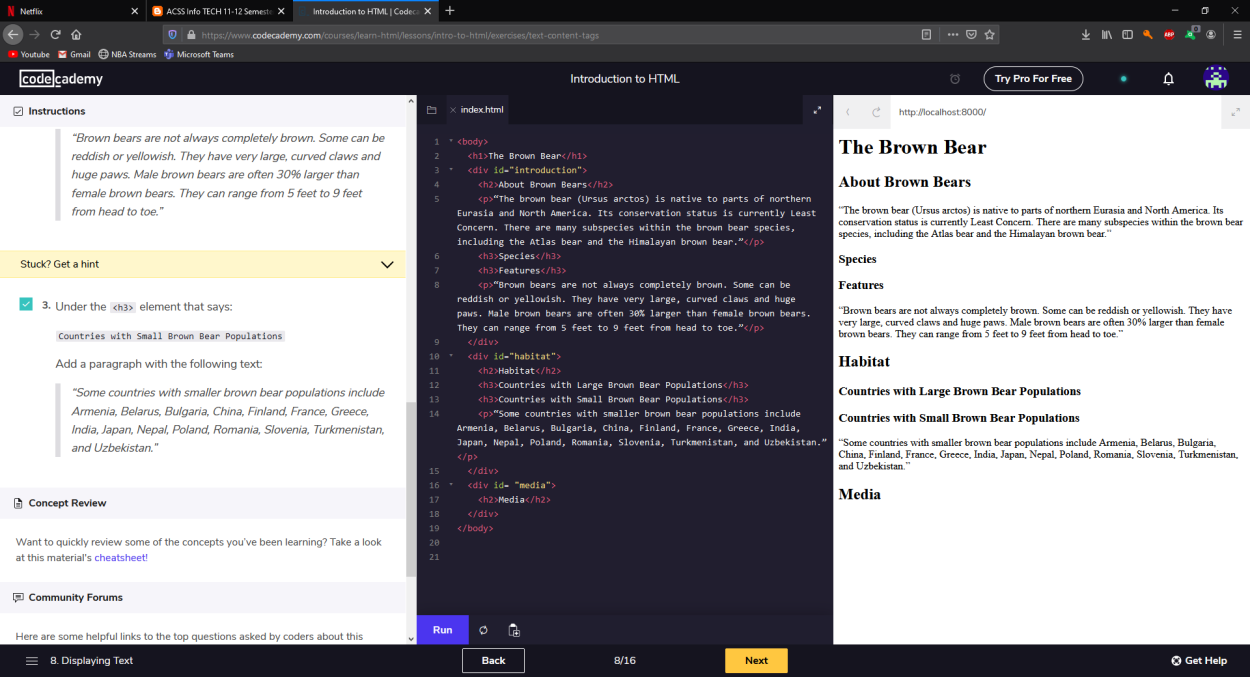
| 1: What I did this hour. I started off by choosing Codeacademy and picked "Introduction to HTML". It started off with the very basic task of writing my name in the header. Next I learned about the family heirarchy of HTML and added some children. Next I started a fake website and added a few headers to it. After the headers I added some divs. After the divs I added IDs to the divs, to sort it better. Next I added a few paragraphs. After the paragraphs I added some emphasis and some strong tags into the mix. Lastly, I added two breaks into the paragraphs. 2: What specific things I learnt. I learned about paragraphs <p>, headers <h1>, learned about the family heirarchy, learned about div IDs <div id="example">, learned about emphasis and strong text <em> <strong>, and last learned about breaks <br> 3: What I will do next hour. Next hour I plan on finishing the introduction to HTML and continuing onto a new more difficult project. |
|
|---|---|
 |
 |
 |
 |
 |
 |
 |
 |
Subscribe to:
Posts (Atom)